
Sparkle for Instagram on iPhone: Features and What's New
Sparkle for Instagram is the real Instagram app with a tweak layer built in. You sign in with your usual account and keep the same feed, stories and DMs. On top of that you get a download manager, a private gallery on your phone, a log of messages people unsend, and a Profile Analyzer that shows who doesn’t follow you back. Sparkle is one of the newest Instagram tweaks, and it gets updated often: version 1.5 came out on 12 October, 1.5.1 followed a day later, and our build is rebuilt on Instagram 451.0.0. Below: what Sparkle is, what it does that stock Instagram won’t, what changed in 1.5, and how it compares with RyukGram.
The short answer
- What it is → the official Instagram app with the Sparkle tweak injected. Same login, same account.
- What it adds → downloads from posts, reels, stories and DMs, a private gallery with a Face ID lock, a deleted-message log, Profile Analyzer, no ads or Meta AI, seen receipts and typing status off.
- What’s new in 1.5 → Japanese and Polish, notifications that look like Instagram’s own, stories you can keep “seen” only on your phone, plus support for Instagram 450.1.0 and 451.0.0.
- Who makes it → an independent developer, as free, open-source software on GitHub.
- How to get it on iPhone → download the Sparkle IPA from builds.io, one tap, no PC and no developer account of your own.
What Sparkle is and where it comes from
Sparkle belongs to the best-known family of Instagram tweaks. Its GitHub page says it began as a fork of SoCuul’s SCInsta, which was itself a fork of BHInstagram. The developer, efibalogh, has since rewritten and extended it well beyond SCInsta, and credits RyukGram and a few other open-source projects for parts of the code. The tweak is published under the GPL-3.0 licence, and the README states that Sparkle is free and has no paid version.
It’s also young. Version 1.0 appeared on GitHub on 9 July 2026, and there have been eight releases so far. Most of them start the same way: support for the Instagram version that came out that week. 1.2.0 added Instagram 441, 1.3.0 added 444, 1.4.0 added 448 and 1.5.1 added 451. That rhythm matters more than any single feature. A tweak is tied to one version of Instagram, and when Instagram changes something inside the app, a tweak that isn’t maintained starts to break: downloads fail, menus disappear. Sparkle has kept up within days each time.
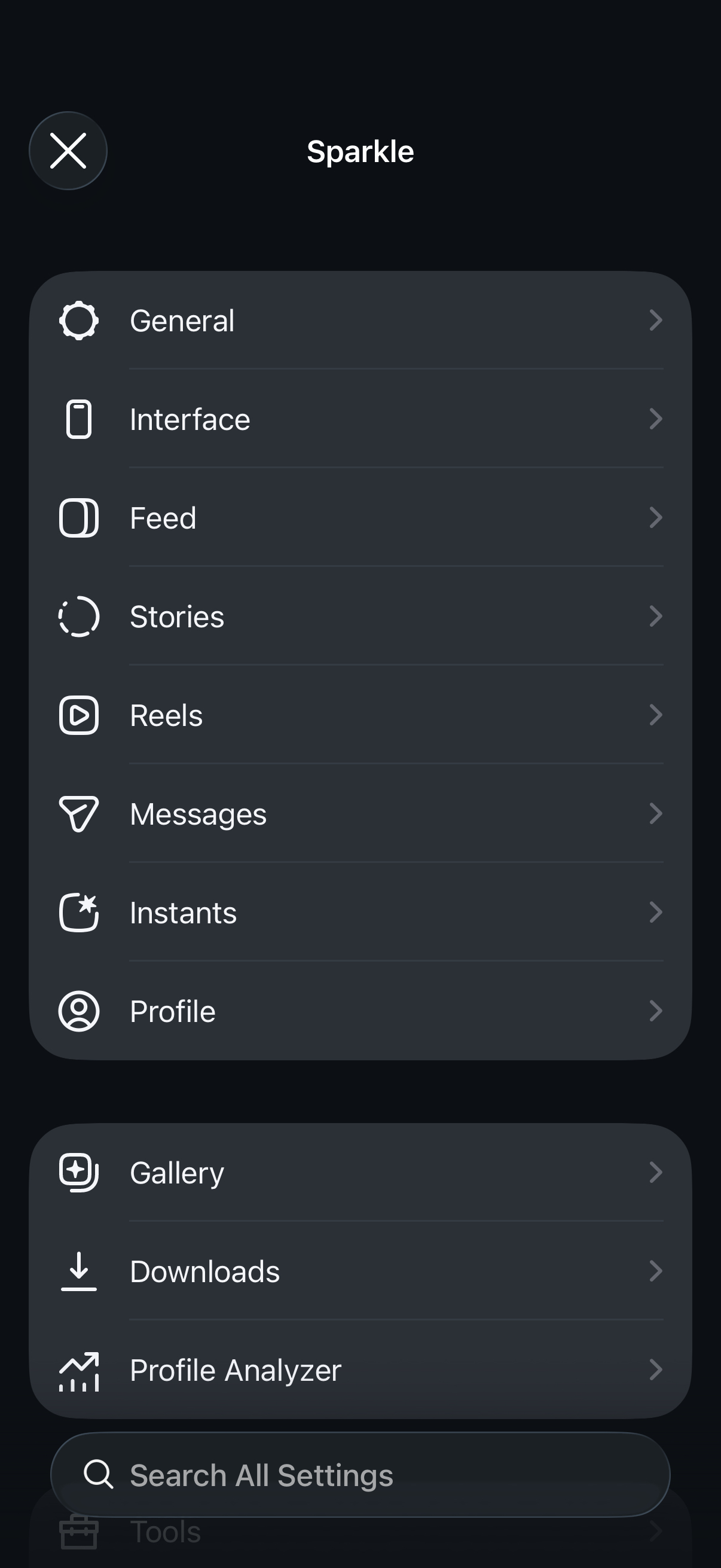
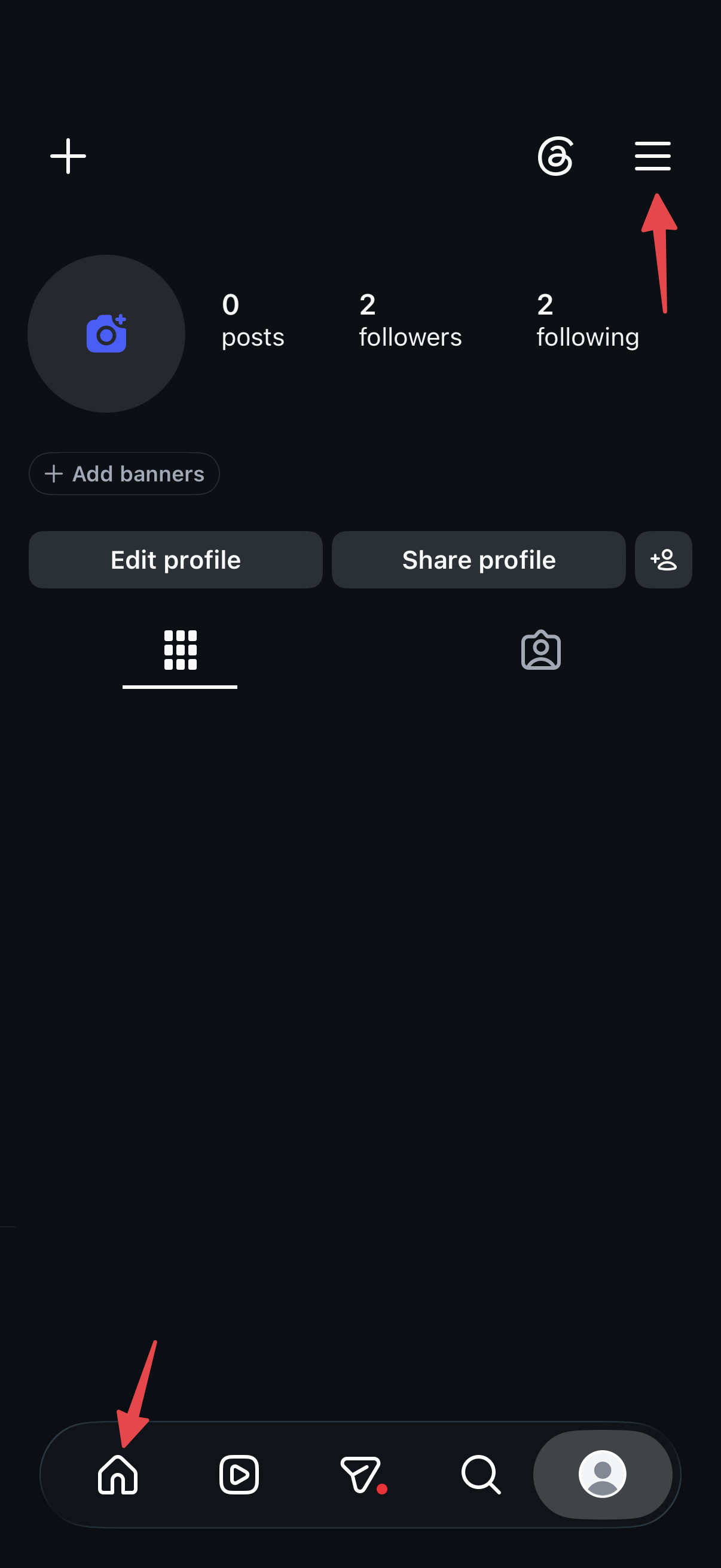
Settings live inside Instagram itself. Long-press the Home tab or the menu button on your profile, and the Sparkle panel opens with a section for every part of the app.
What Sparkle does that stock Instagram won’t
Downloads and a private gallery
Sparkle adds its own action menus to the feed, reels, stories, DMs, Instants and profiles, and from them you can save posts, reels, stories, DM media, Instants and comments to your phone. Downloads go through a queue with retries and duplicate detection, and videos are saved in high quality with the sound merged in. You can also have stories, view-once DM media and Instants saved automatically as you watch them.
What you save doesn’t have to go to your camera roll. Sparkle keeps a private gallery inside the app, with folders, search and an optional passcode, Face ID or Touch ID lock. Built-in editors let you trim a video down to a clip, a single frame or just the audio, crop, zoom, rotate or flip it, and edit photos before saving. You can also import your own photos and videos from Files and send them as an Instant.
Deleted messages and view-once media
When someone unsends a DM or removes a reaction, stock Instagram simply drops it. Sparkle keeps a browsable log of unsent messages and removed reactions, and recovers view-once media. Chats you’d rather not see in the inbox can be hidden with a long press, muted and protected with Face ID or a passcode.
Profile Analyzer
Instagram shows you numbers, not names. Sparkle’s Profile Analyzer fetches your followers and following lists and shows mutuals, accounts that don’t follow you back, and a log of changes between scans, so you can see who followed or unfollowed since last time. It’s in the main Sparkle panel, under Gallery and Downloads.
Less noise, more privacy
Ads, Meta AI and suggested content can be hidden. Seen receipts and typing status can be switched off, so reading a message or a story doesn’t tell the other person. Links you copy or open have their tracking parameters removed, and there’s a doom-scroll limit for reels if you want one. Every account you’re signed into keeps its own Sparkle settings, gallery and download history.
What’s new in Sparkle 1.5
The latest release was posted on GitHub on 12 October, with a follow-up the next day. The highlights from the developer’s release notes:
- Instagram 450.1.0 and 451.0.0. 1.5.0 added support for 450.1.0, and 1.5.1 for 451.0.0, the version our build is rebuilt on. 1.5.1 also fixes hidden tabs reappearing when you swipe between tabs.
- Japanese and Polish. Both now ship with Sparkle and were reviewed by native speakers. Other languages have been available as packs for a while, but the developer notes that most of them are machine translations nobody has reviewed yet. English, Japanese and Polish are the ones checked by people.
- Instagram-style notifications. Sparkle’s alerts, for example when a download finishes, can now use Instagram’s own pop-up style with Instagram’s icons and a progress ring you can cancel, instead of Sparkle’s pill. Notification settings are now split into separate pages: style, appearance, behaviour, what to notify you about, and haptics.
- Keep Seen Locally. With manual “mark seen” on, a story you watch turns grey on your phone and moves to the seen part of the tray, but no seen receipt goes out. A list lets you put someone’s stories back to unseen.
- Fewer AI buttons. The AI Restyle button on stories and the AI effects tool in the story camera can be hidden, and Meta Verified offers and suggested Facebook pages get their own hide switch.
- Smaller fixes that matter. Downloads that used to fail with “missing media response” now retry and switch to another video source. Trims render at the quality you chose to download in. Instagram’s newer tracking tags are stripped from shared links. The long-press menu in DMs is back.
There’s also a new Liquid Glass app icon in default, dark and clear versions, a way to pin people to the top of the share sheet, and a choice of whether reels auto-scroll at launch.
What’s in our build
Our Sparkle for Instagram build is dated 13 October 2026 and, per its changelog, is updated for Instagram 451.0.0. That’s the Instagram version Sparkle 1.5.1 was released for.
It’s the fourth rebuild since August. The changelog history on the catalogue page:
- Instagram 441.0.0 · Sparkle 1.2.0 (12 August): import your own media into the gallery from Files, a framing editor for video (crop, pan, zoom, rotate, flip), auto-saving of stories, view-once DM media and Instants, sending a photo or video as an Instant, and a fix for a freeze after navigating a few screens deep.
- Instagram 444.0.0 (2 September), 448.0.0 (25 September) and 451.0.0 (13 October): rebuilt for each new Instagram version.
Sparkle or RyukGram?
Both come from the same BHInstagram and SCInsta line, and Sparkle’s README credits RyukGram directly, so they overlap a lot: downloads, viewing stories without being seen, keeping unsent DMs, hiding ads and Meta AI. Where they differ:
- Sparkle puts more into what you keep and what you learn: the private gallery with folders and editors, the Profile Analyzer, and the new Instagram-style notifications. So far it has caught up with each new Instagram version within days.
- RyukGram is the one for a true-black OLED theme, per-chat backgrounds and app-wide fake location. Our RyukGram guide covers it in detail.

If you want to compare more than two, our roundup of the best Instagram tweaks for iPhone puts IGFormat, Instagram Rocket, BHInsta and Instagram Theta side by side, and the list of tweaked apps for iPhone covers tweaks for the other apps you use.
What to know before you install
- It’s tied to one Instagram version. Our build runs Instagram 451.0.0, and updates come from builds.io, not the App Store. When Instagram moves on and Sparkle catches up, a new build appears on the catalogue page and you install that.
- Not every language has been checked. Apart from English, Japanese and Polish, the language packs are mostly machine translations.
- Some features depend on Instagram. Auto Scroll for reels only works on accounts where Instagram offers it. Confirming an Instant before sending works for recorded videos, not photos.
- It’s the real Instagram underneath. Your account, followers and messages are the same ones you see in the official app.
How to install Sparkle on iPhone

Sparkle itself is free. What builds.io handles is getting it onto your iPhone and keeping it there. Download the Sparkle for Instagram IPA in one tap, with no PC and no developer account of your own:
- Register your iPhone at builds.io by entering one UDID in the browser.
- Open the Sparkle page and tap GET. It installs like a normal download.
- If the first launch says “processing”, that’s Apple’s signing queue, not an error. Most devices are ready within a day, and some take up to three. It only happens once (what the wait is).
- Sign in with your Instagram account and long-press the Home tab to open Sparkle’s settings.
It stays signed for as long as your subscription runs. Apps from free signers stop opening after seven days and have to be reinstalled (why that happens), and an Instagram that stops opening every week takes your private gallery offline with it.
Credits and source code
Sparkle is made by efibalogh and released for free under the GPL-3.0 licence. Everything about the tweak comes from its author:
- Source code: github.com/efibalogh/sparkle-ig
- Releases and release notes: GitHub Releases
- Official site: efibalogh.github.io/sparkle-ig
- Full changelog: Sparkle changelog
- Built on SCInsta by SoCuul and BHInstagram by BandarHL
builds.io does not develop Sparkle. What we provide is the install: a signed build you can put on your iPhone in one tap and keep running. If you build it yourself from source, that’s free too — the instructions are on the GitHub page.
FAQ
What is Sparkle for Instagram? A tweak for the official Instagram app on iPhone. It adds downloads, a private gallery, a deleted-message log, Profile Analyzer and privacy controls to the app you already use.
Is Sparkle free? Yes. It’s open source under GPL-3.0, and its developer says there is no paid version. The source code is on GitHub.
What’s the latest version of Sparkle? 1.5.1, released on 13 October 2026. It adds support for Instagram 451.0.0. Our build is rebuilt on that Instagram version.
Does Sparkle work with my normal Instagram account? Yes. It’s the real Instagram app, so you sign in the usual way and see the same feed and DMs. Settings are kept separately for each account you add.
How do I open Sparkle’s settings? Long-press the Home tab or the menu button on your profile.
Can Sparkle show who unfollowed me? Its Profile Analyzer scans your followers and following and keeps a log of changes between scans, so you can see who unfollowed since the last scan, along with mutuals and accounts that don’t follow you back.
Is Sparkle available in other languages? English, Japanese and Polish ship with Sparkle and were reviewed by people. More languages are available as downloadable packs, though most are machine translations.
If you’d like Instagram with a gallery of your own, start with the Sparkle card above, or browse more tweaks in the whole catalogue at builds.io.