
Shadowrocket on iPhone: What the IPA Gets You and How to Set It Up

Most people meet Shadowrocket the same way: they need one app on their iPhone to take a different route to the internet than everything else, find that iOS gives them a single system-wide switch and nothing finer, and start searching for the app power users keep naming. It is a rule-based proxy client — a traffic router that sits between your apps and the network and decides, connection by connection, what goes where. This is what it actually does, and how to get it running.
What Shadowrocket actually is
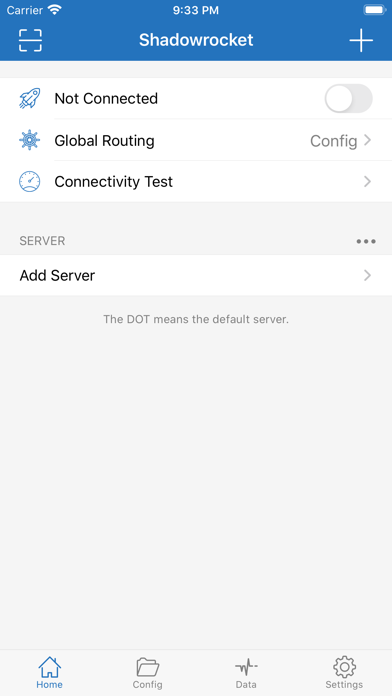
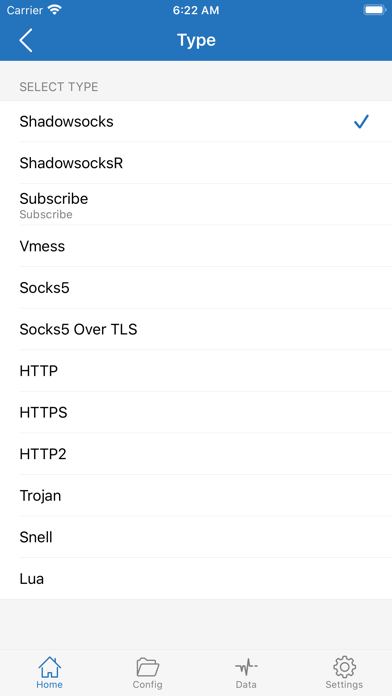
Shadowrocket registers itself as a VPN profile on iOS, which is how it gets to see traffic at all, but it is not a VPN service. It ships with no servers of its own and sells no subscription. You point it at a proxy you already have — Shadowsocks, VMess, Trojan, Socks5, HTTP, Snell and a dozen other types are supported — and then write rules about which traffic goes through it.
That rule layer is the whole point. A regular VPN app is on or off: everything tunnels, or nothing does. Shadowrocket matches each connection against a list — by domain, domain suffix, keyword, IP range or GeoIP country — and routes the match to a proxy, straight out, or into a black hole. One app can go through a server abroad while your banking app stays on the local connection and ad domains never resolve at all.
Why people look for the IPA
Shadowrocket is a paid App Store app, and a regional one: it appears in some country storefronts and not others, and it has moved between them more than once. The practical result is that a lot of people who want it are looking at a store page that either asks for a purchase in a country they are not in, or does not exist for them at all. Hence the searches for the IPA.
Installing it from a catalogue instead also sidesteps the thing that kills sideloaded utilities: a build installed through a free signer stops working after seven days, and Shadowrocket is exactly the kind of app you want running permanently rather than one you re-sign every week. Here is why that expiry happens.
Setting up your first server
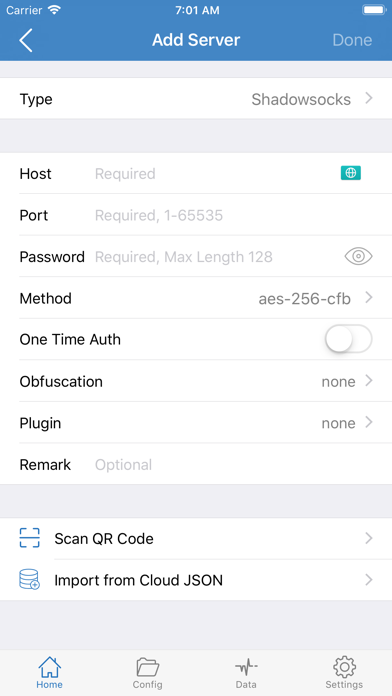
The Add Server sheet is plain: pick a type, paste in host, port and password, choose an encryption method, add a remark so you can tell servers apart later. If your provider gave you a QR code or a subscription link, the two buttons at the bottom of that screen — Scan QR Code and Import from Cloud JSON — skip the typing entirely, and a subscription link keeps the server list updated on its own.
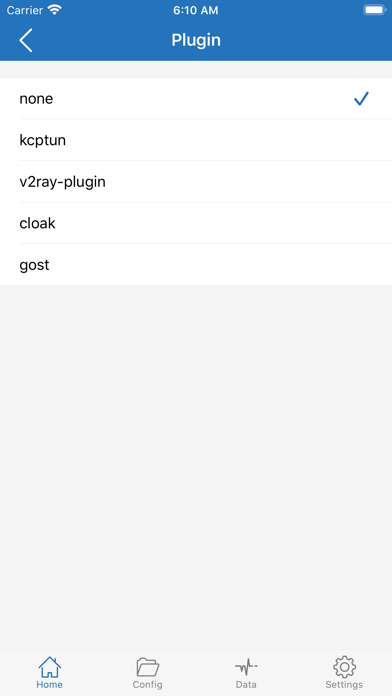
Flip the connection toggle on the home screen and iOS asks once to add the VPN configuration. After that the toggle is the only thing you touch day to day.
Rules are where it gets useful
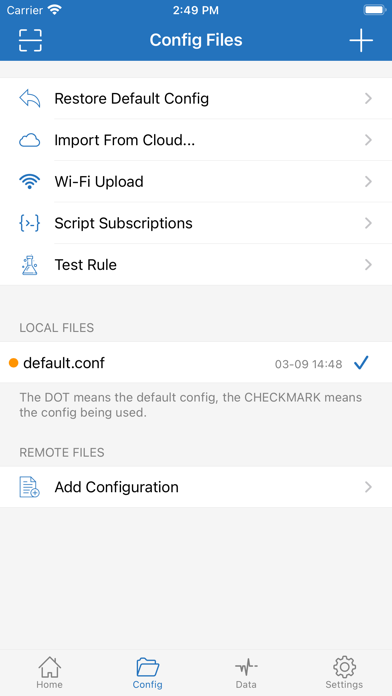
Global Routing on the home screen sets the default: send everything through the proxy, send nothing, or — the mode most people end up in — let the config’s rule list decide. The Config tab holds those rule files. A default one ships with the app, and you can restore it, edit it, import one over Wi-Fi from your computer, or point the app at a remote configuration that updates itself.
Three rules cover most of what people actually want:
- One app abroad, everything else direct. Match that service’s domain suffix, route it to your proxy, leave the final catch-all rule on DIRECT. Nothing else on the phone changes.
- Ad and tracker domains into a black hole. Match by domain or keyword and route to REJECT. The connection fails instantly instead of loading, which is faster than an ad that loads and then gets hidden.
- A whole country direct. A GeoIP rule keeps local traffic — your bank, your carrier’s portal, delivery apps that geofence — off the proxy, where it belongs.
The Test Rule tool in the Config tab tells you which rule a given hostname actually hits, which saves a lot of guessing when two rules overlap.
Seeing the traffic
The Data tab is the part that turns Shadowrocket from a router into a diagnostic tool. It logs connections as they happen — which app, which host, how much data, over Wi-Fi or cellular, proxied or direct. Turn on HTTPS decryption with the app’s own certificate and you can read the requests themselves and rewrite URLs before they go out.
That is genuinely useful for finding out what an app on your phone is talking to, and it is also the feature to be careful with: installing a certificate that can read your own encrypted traffic is a real change to your device’s trust, and it belongs on a phone you control, for traffic you are entitled to inspect. Turn it off when you are done.
Install Shadowrocket on iPhone
No computer, no developer account, no weekly refresh. Open the app page on your iPhone and tap GET.

You register the iPhone once with its UDID, in the browser. If the first launch reports “processing”, that is the one-time signing step rather than an error — most devices clear it within a day, some take up to three, and it never happens again.
Where it fits with everything else
Shadowrocket is the heavyweight of this corner of the catalogue, and it is not the only tool there. If what you need is JIT for an emulator rather than routing, LocalDevVPN does that job with a local profile and no server at all. If you are still assembling the rest of the phone, the best apps to sideload on iPhone is the short list worth starting from.