
Ryu Anime App on iPhone — Free Streaming Without a Subscription
If you searched for the Ryu anime app on iPhone, you were after a single place to open, pick a show, and watch — subbed or dubbed, no monthly fee, no ads breaking up an episode. Ryu does exactly that on iOS: it pulls from a handful of anime sources, streams in decent quality, and lets you download episodes for offline viewing. There is no account to create and nothing to pay. Here is what the app actually does and how to install it without a jailbreak or a computer.
What the Ryu anime app actually is
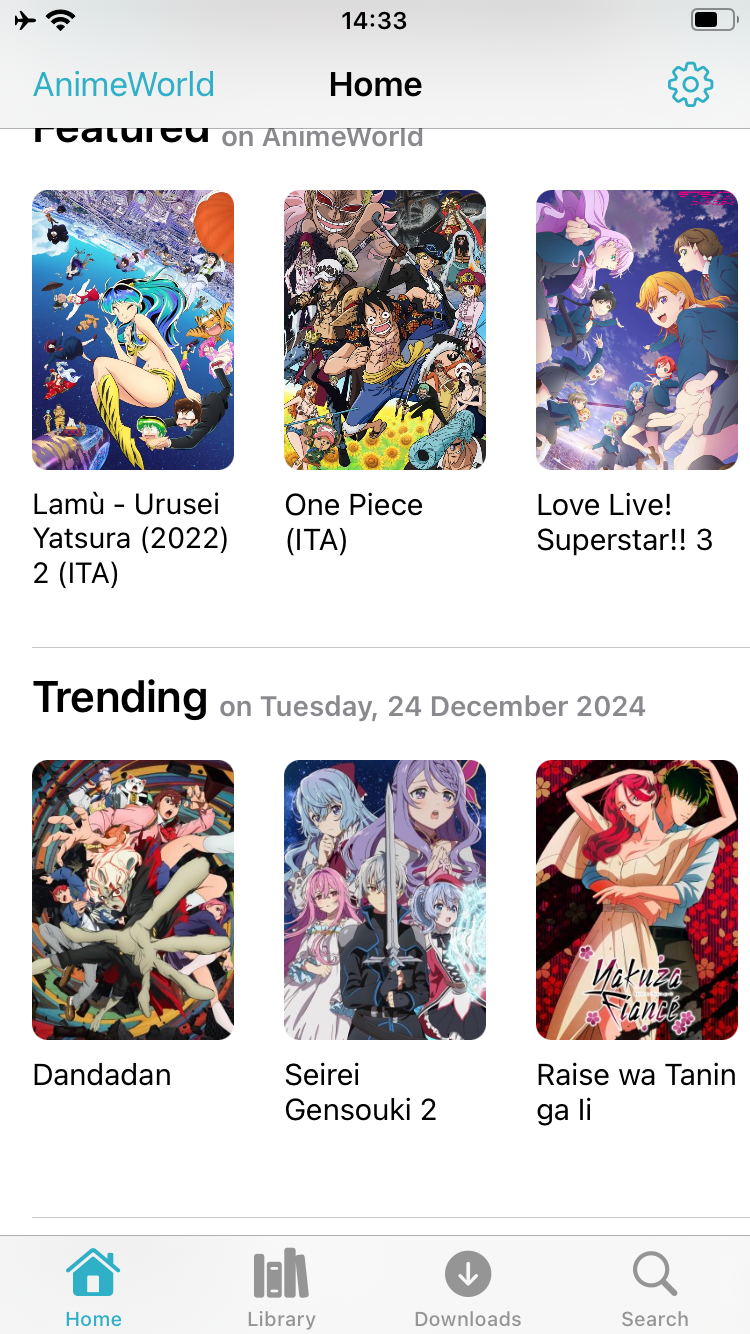
Ryu is a free, open-source anime streaming client for iPhone and iPad, built by a developer who goes by cranci1 and released under the GPLv3 license. The important thing to understand is that Ryu does not host any anime itself. It is a front end: it searches across roughly ten third-party anime sources — AnimeWorld, GoGoAnime, AnimeHeaven, AnimeFire, HiAnime and several others — and plays whatever those sites already serve. The app’s own note puts it plainly: the content is not affiliated with the developer, it comes from non-affiliated sources, and Ryu stores nothing server-side. That design is why it stays lightweight (the build in our catalog is about 6 MB) and why it never asks you to sign up.
Because those sources span different languages, you get more than just English subs. The same search can surface Italian, Portuguese, Spanish, Arabic and Indonesian catalogs, which in practice means older or more obscure titles that a single English site would not carry. When one source is down or missing an episode, you switch to another instead of hitting a paywall. That breadth, plus the ad-free interface, is why Ryu tends to come up first when iOS users ask where to watch anime for free — it does one job and stays out of the way.
Streaming and offline downloads
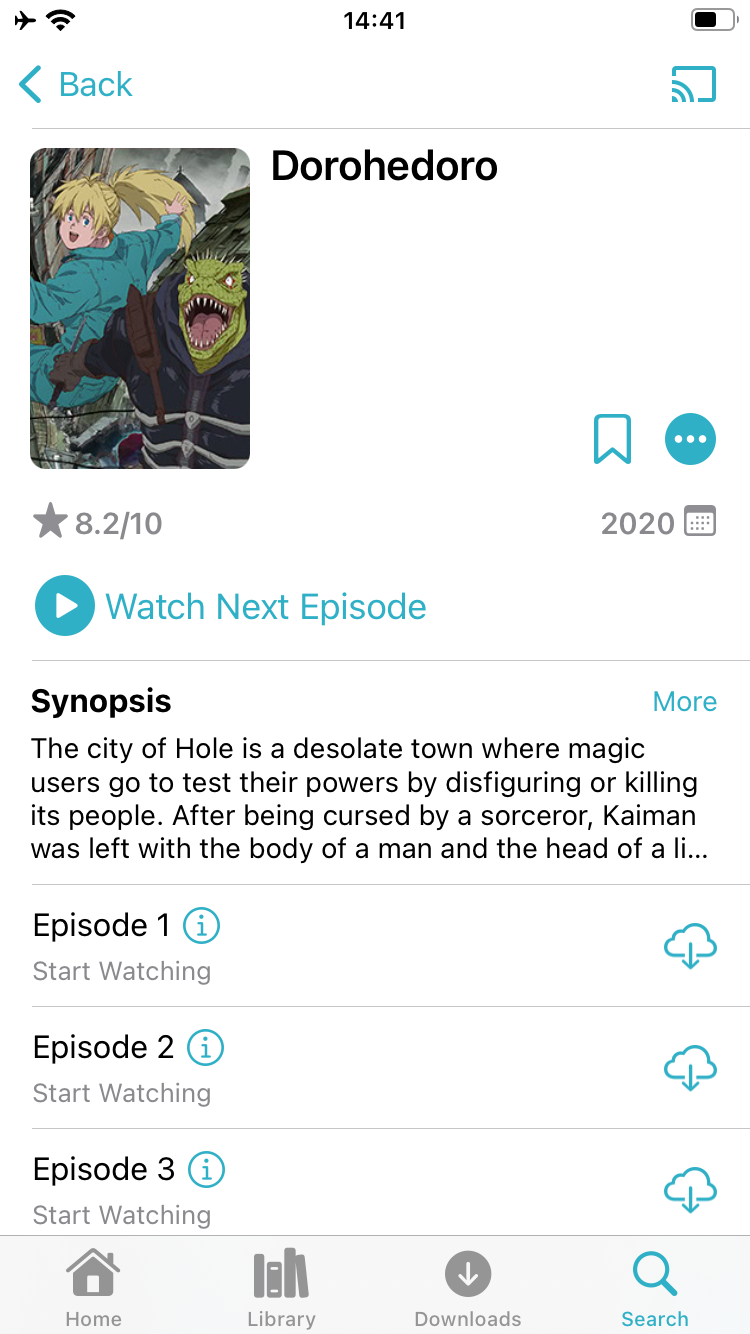
The core loop is simple: search a title, open the series page, and either stream the next episode or queue it for download. Downloads are the feature most streaming subscriptions handle poorly on iOS — Ryu saves episodes straight to the device so you can watch on a flight or a subway with no signal, then delete them when you are done. Playback supports Picture-in-Picture, so an episode keeps running in a corner while you reply to a message, and background playback keeps the audio going with the screen off. For the big screen, Ryu supports Google Cast and AirPlay, so a series you found on your phone can throw to a TV without a separate app.
Quality depends on the source rather than the app, but the better providers stream at watchable HD and the download option lets you keep a clean copy regardless of your connection at playback time.
AniList sync, no account required
Ryu does not make you register, but it will connect to AniList if you already track your watching there. Link the account once and Ryu updates your progress as you finish episodes, so your list stays current across devices and other AniList apps. The login token is stored in the iOS Keychain rather than in the app’s own files, and there is a built-in backup and restore for your library and settings — useful when you move to a new phone. Everything else, from your download list to your watch history, lives on the device.
Ryu versus an anime subscription
The pitch against a paid service is straightforward. A single streaming subscription gives you that platform’s licensed library and nothing else; a title stuck on a competitor’s service is simply unavailable to you. Ryu inverts that — it reaches across many sources at once, in several languages, for free and without ads. For someone who watches broadly rather than following one platform’s slate, that coverage is the whole point.
The honest caveat is reliability. Because Ryu depends on third-party sites it does not control, a given source can go offline, change its layout, or drop an episode, and the app has to catch up. That is the trade-off for free, aggregated access, and it is why an app that is easy to reinstall and keep updated matters more here than for a first-party app.

How to install Ryu on iPhone
Ryu is not on the App Store, so on builds.io it installs the way any sideloaded app does — no jailbreak, no PC, no developer account. Open the app page below on your iPhone, tap GET, and install from Safari.

Ryu runs on iPhone and iPad with iOS or iPadOS 14 or later, so almost any current device is covered. The first time you add a device, Apple runs a one-time “processing” step on the signing certificate: most iPhones are ready within a day, and some take up to three days while Apple processes them. It is normal and happens once — after that, every install is instant. Keeping the app installed from a maintained source also means it stays signed, so it will not die a few days later the way a random IPA mirror does.
If you are weighing your options before committing to one app, our roundup of the best free anime apps for iPhone compares Ryu with the manga side of the setup and explains why the browser and App Store alternatives fall short. And if you want the same no-subscription approach for movies and TV rather than anime, see MovieBox Pro on iPhone.