
Quanto & Univershuffle Unlocked

Two apps arrived in the catalogue this week: one counts what the day cost, the other picks its music. Both ask for money at the door — a subscription or a purchase screen — and in these builds the door is open. Download either of them as an IPA and install on your iPhone in one tap, no PC and no developer account of your own.
Quanto
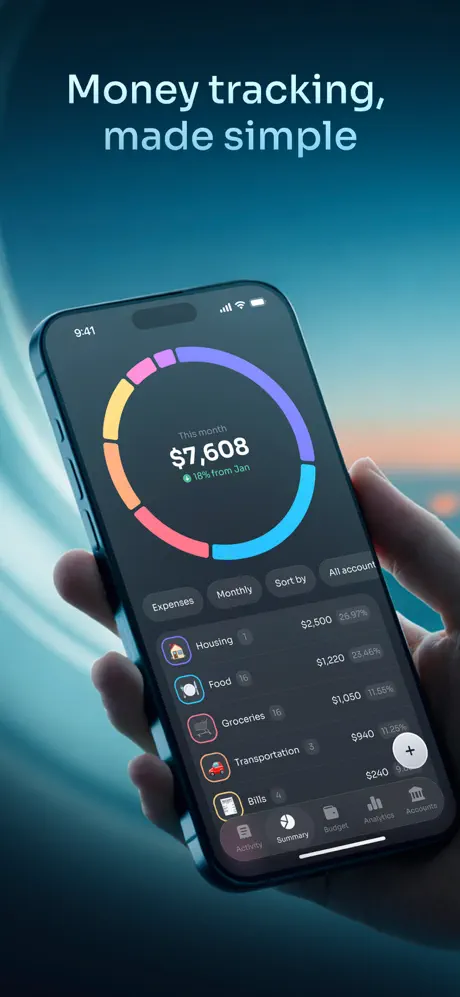
Quanto is an expense tracker for iPhone and iPad for people who want a clear view of their money without connecting a bank account. Getting a purchase in is the part it works on: photograph a receipt, paste a screenshot from a payment app, import a PDF statement or dictate several expenses at once, and the AI-assisted entry sorts out the rest, foreign-currency spending included. The data stays on your device. It runs on iOS 15.5 and later.
What’s unlocked: the purchase page is skipped — the app opens straight into tracking instead of stopping you at the paywall first.

Univershuffle
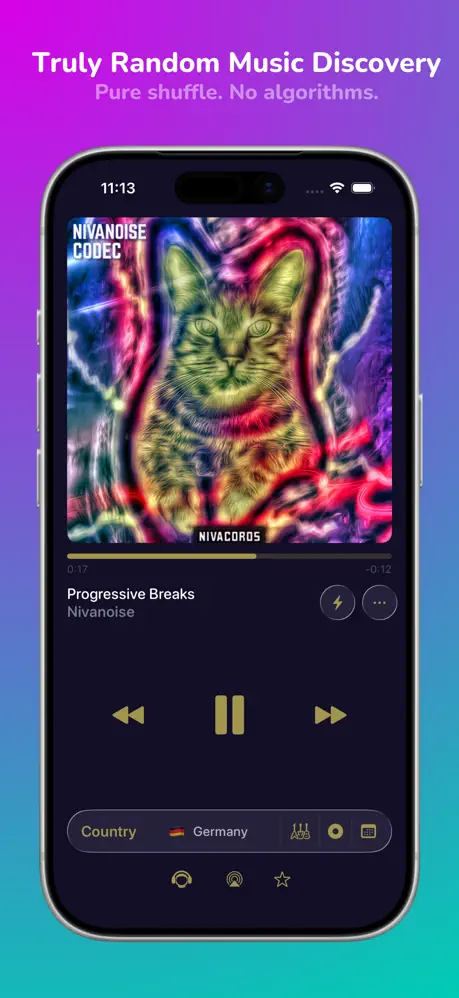
Univershuffle is the second app from Adam Linder, a solo developer in Philadelphia, and its whole pitch is the absence of an algorithm: it takes the 100 million or so tracks on Apple Music and shuffles all of them. No taste profile, no “because you listened to” — just whatever comes up next. Full playback needs an Apple Music account; without one you hear 30-second previews. It needs iOS 17 or later.
What’s unlocked: the subscription, so the paid features work without a plan.
How to install
Both install from builds.io like a normal App Store download — tap GET, install, open. No PC, and no developer account of your own to keep alive. When you add a new device, Apple runs a one-time “processing” step: most devices are ready within a day, and some take up to three days while Apple works through them. It happens once, and every install after that is instant.
Last week’s new arrivals leaned towards reading and messaging — Epic!, Novagram and ClipGlider. For the wider shelf, see our list of tweaked apps for iPhone.